
Ready to treat yourself or someone else to a curated snack box? This guide will walk you through the simple steps to place a "Myself Order" for non-US or international recipients, ensuring a delightful experience no matter where you are.
Here’s a step-by-step guide for creating a Myself Order for Non-US or International Recipients
Log in Or Sign Up
- Go to snackmagic.com and click LOGIN/SIGN UP
- Log in to your account or sign up for an account if you don't have one yet
Access Your Country's Menu
- You'll be prompted to the international Snackmagic menu based on your location.
- You may also change your location accordingly by clicking the Flag icon at the top next to your Account Name.
- Click the 'VIEW MENU' button to see the list of stashes available in your country
- If you have an existing account with an unredeemed treat, you can click the 'JUST TAKE ME TO THE MENU - I'LL ORDER FOR MYSELF' link if you want to buy snacks for yourself or someone else.
- If you want to redeem your treat instead of placing a Myself Order, follow the article linked below:
✨ Redeeming Your Snackmagic Treat (For Recipients Outside the US & Canada)
Select Your Stash and Set Budget
- Browse through your country's menu and select the stash you desire. You may also utilize the filters on the left-hand side of the page.
-
Select or enter your desired treat budget amount, ensuring it meets the minimum requirement shown in the text box. Please note that the minimum amount may vary by country.
-
Afterward, click the "ADD BOX" button.
-
Checkout Process
- When you're ready to checkout, click the Bag Icon in the top right corner
- You'll then be prompted to the Order Summary page where you can review your order.
- You can click the 'CHECKOUT' button from here to complete your purchase.
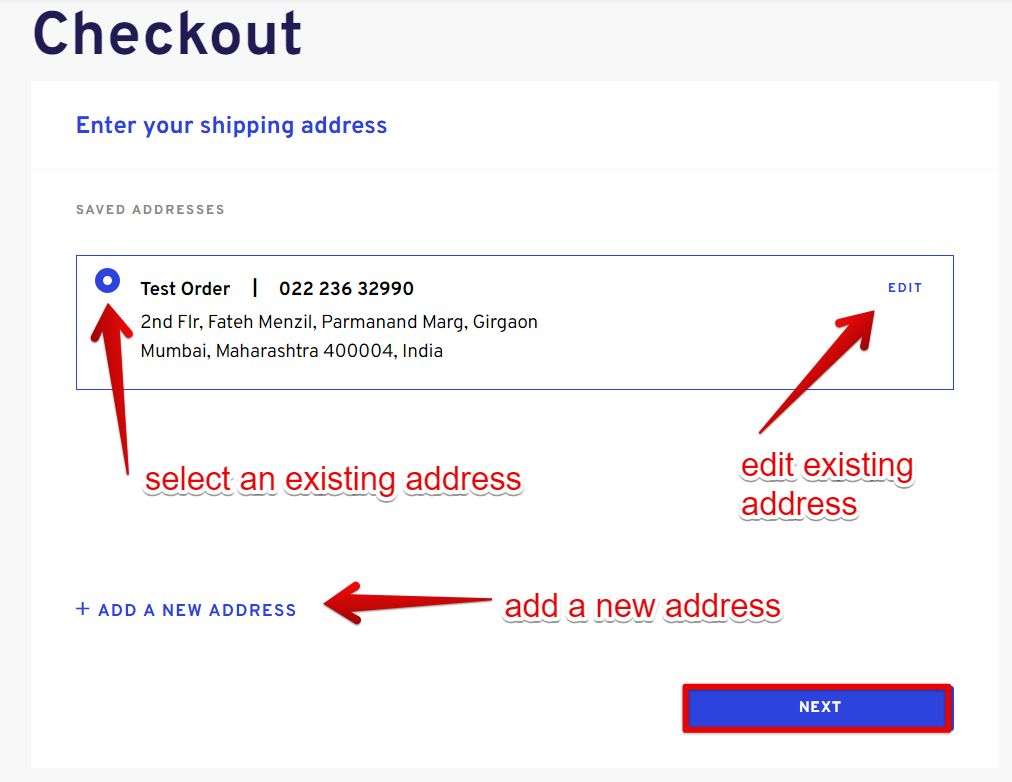
Provide Your Shipping Address
- If you're sending the order to someone else or don’t have an address saved yet, click the 'ADD NEW ADDRESS' link.
- If you have an existing address, simply select the one where you’d like the order delivered.
- You can also click on 'EDIT' to modify an existing address if needed.
- Click 'NEXT' to continue
Add a Custom Note
- If you wish to add a custom note, click 'Yes, add a note'.
- From here, you can either write a note (500 characters max including spaces) or upload an image/logo.
Enter or choose a Payment Method
- Proceed to add or select your preferred payment method.
- Corporate Billing is available for 100 + boxes. Pre-approval needed.
- Click 'REVIEW ORDER' to proceed.
Place Your Order
- Verify that all details are correct, then click "PLACE ORDER" to complete your purchase.
In select countries, including India, the Philippines, the UK, and Singapore, you have the option to pay in local currency. In all other regions, transactions will be processed in USD.
Confirmation
- Once your order is complete, you will receive a confirmation that includes your order number, which will also be sent via email. You can download your receipt from this confirmation.
Your order will arrive within 10 to 14 days.
Any question(s)? We're here to help!
Ask us anything via CHAT / FILL OUT OUR CONTACT US FORM:
or
Request a demo with our account specialist here.
Comments
0 comments
Please sign in to leave a comment.